
Android开发规范
大约 4 分钟
Android开发规范
作 者: zhang_qi
日 期: 2023-01-09
第一章 IDE与基本规范
- IDE: Android Studio stable latest version
- Language: Kotlin (Primary) / Java
- CodeStyle and copyright
- Lint, StrictMode and Leak analysis
- 3rd library import rule
- Proguard
Kotlin语言规范
开发以Kotlin语言为主,新人在开发前,至少要完整看一遍此文档 https://www.kotlincn.net/docs/reference/coding-conventions.html
Android开发规范
CodeStyle and copyright
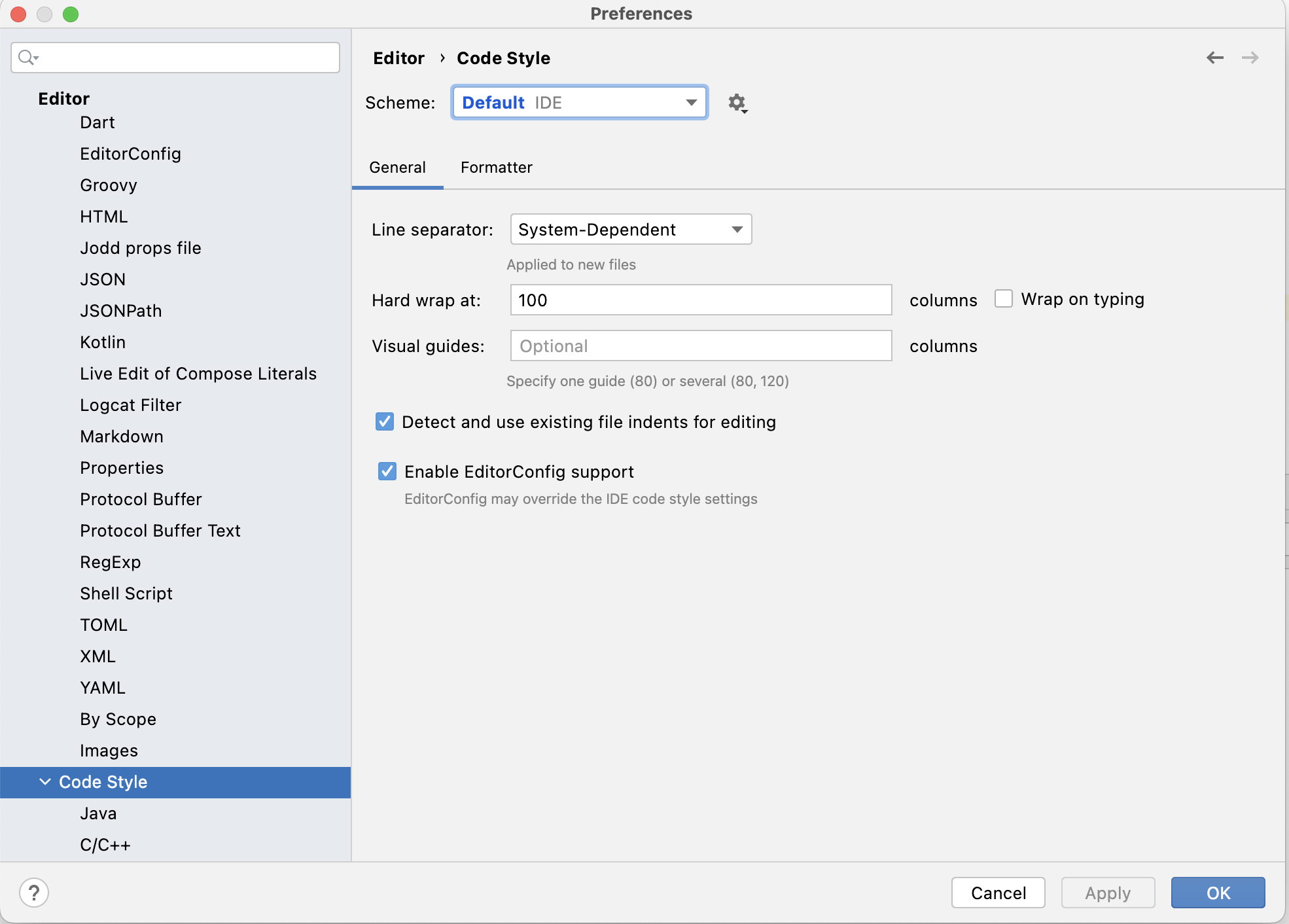
CodeStyle
使用IDE default规则
Copyright
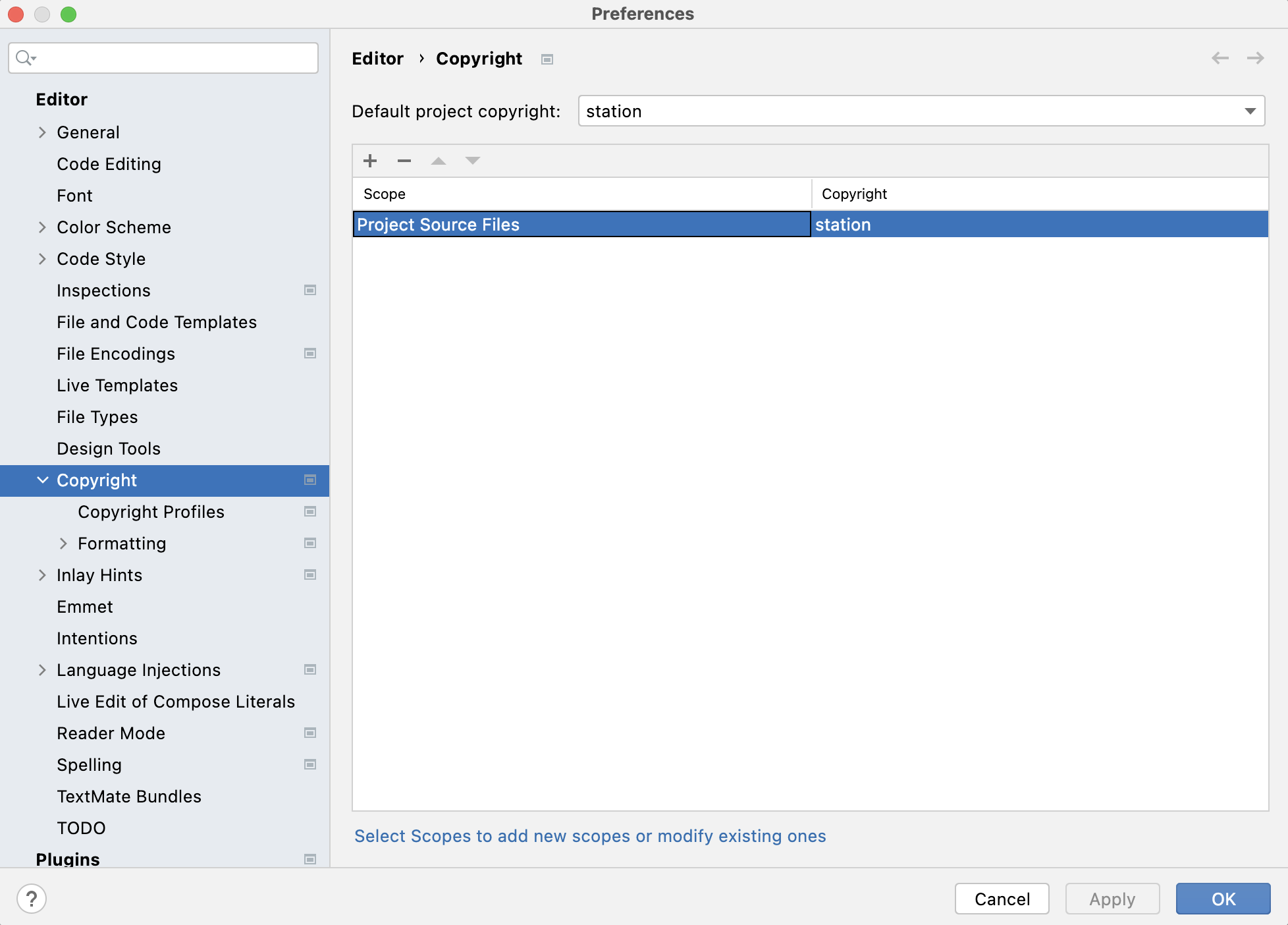
在IDE里面导入对应的copy right
国外项目:
Copyright (c) $today.year Station. All rights reserved.
国内项目:
Copyright (c) $today.year Woodare. All rights reserved.

Lint, StrictMode and Leak checking
Lint
各个项目组根据实际情况进行修改或添加,配合gitlab pipeline确保每个人提交的代码都经过Lint检查才能merge,禁止随意添加SuppressLint注解来逃避lint检查,code review时要解释原因
<?xml version="1.0" encoding="utf-8"?>
<lint>
    <issue id="AnimatorKeep">
        <ignore regexp="setMaxLines" />
    </issue>
    <issue id="NewApi">
        <ignore regexp="android.webkit.WebView.FindListener" />
    </issue>
    <issue id="UseSparseArrays" severity="ignore" />
    <issue id="MissingTranslation" severity="ignore" />
    <issue id="UnusedResources" severity="ignore" />
    <issue id="TypographyDashes" severity="ignore" />
    <issue id="TypographyEllipsis" severity="ignore" />
    <issue id="Overdraw" severity="informational" />
    <issue id="IconLauncherShape" severity="informational" />
    <issue id="ResourceType" severity="ignore" />
    <issue id="RestrictedApi" severity="ignore" />
    <issue id="ClickableViewAccessibility" severity="informational" />
    <issue id="OldTargetApi" severity="informational" />
    <issue id="QueryPermissionsNeeded" severity="informational" />
    <issue id="ContentDescription" severity="ignore" />
    <issue id="HardwareIds" severity="informational" />
    <issue id="RtlHardcoded" severity="error" />
    <issue id="SpUsage" severity="error" />
    <issue id="InflateParams" severity="informational" />
    <issue id="CustomSplashScreen" severity="ignore" />
    <issue id="UnusedAttribute" severity="error" />
    <issue id="ScrollViewSize" severity="error" />
    <issue id="StaticFieldLeak" severity="error" />
</lint>
StrictMode
Android SDK自带的代码检查工具,会在平时开发的logcat里面列出警告
object SDMStrictModeUtil {

    fun config() {
        if (BuildConfig.DEBUG) {
            StrictMode.setVmPolicy(
                VmPolicy.Builder()
                    .detectActivityLeaks()
                    .detectLeakedClosableObjects()
                    .penaltyLog()
                    .build()
            )
            StrictMode.setThreadPolicy(
                ThreadPolicy.Builder()
                    .detectCustomSlowCalls()
                    .penaltyLog()
                    .penaltyFlashScreen()
                    .build()
            )
        }
    }
}
Leak analysis
内存泄漏检查工具,项目搭建时集成
debugImplementation 'com.squareup.leakcanary:leakcanary-android:2.10'
3rd library import rule
需要引入第三方库的时候,必须上报给项目Leader审查,主要审查内容有:
- copy right license检查,是否是开源MIT,appache,如果不是或者未标注则不能随意引用
- 第三方库是否持续维护,最新更新日期至少在2年以内
- 如果基于第三方库进行源码引入,必须code review确保每个文件的copy right更新到公司对应的copy right
Proguard
在项目功能开发接近尾声的时候,项目Leader需要配置proguard文件,配置原则:
- 排查项目工程的所有依赖,确保每个依赖库有proguard说明的都添加进来
- 工程文件中,需要排除混淆json model, jni native, 其他一些个别class需要排除的话,请使用@Keep注解
第二章 Git and Code review
.gitignore
在创建工程时,IDE会自动生成.gitignore文件,需要按照如下内容对比检查此文件。
*.iml
.gradle
.idea/
/build
/captures
.externalNativeBuild
.cxx
local.properties

# OS-specific files
.DS_Store
.DS_Store?
._*
.Spotlight-V100
.Trashes
ehthumbs.db
Thumbs.db
/build/
Code Review and pipeline代码检查
- 在项目根目录下创建pipeline文件.gitlab-ci.yml,内容参考:
stages:
  - lint
  - release

before_script:
  - chmod +x ./gradlew
  - echo sdk.dir=$ANDROID_HOME > local.properties

staticAnalysis:
  stage: lint
  tags:
    - ANDROID_RUNNER_TAG
  script:
    - ./gradlew lintDebug assembleDebug --stacktrace
  artifacts:
    name: "reports_${CI_PROJECT_NAME}_${CI_BUILD_REF_NAME}"
    expire_in: 4 days
    paths:
      - app/build/reports/

.build_release_config:
  stage: release
  when: manual
  tags:
    - ANDROID_RUNNER_TAG
  artifacts:
    paths:
      - app/build/outputs/apk/*
    expire_in: '2 days'
#  only:
#    - master

build_release:
  script:
    - ./gradlew --stacktrace assembleRelease
  extends:
    - .build_release_config
- 在项目Leader工程搭建好之后,需要上传到公司gitlab,创建2个主分支:Master 和 develop,develop属于开发分支设置为default分支,平时所有开发创建的merge request应该都指向到此分支;Master是稳定版分支,单独由项目Leader负责维护,将稳定版develop分支代码创建merge request指向到master。在gitlab上面把这两个分支设置为保护,并设置不允许任何人push。并在gitlab和pipeline主机上配置好pipeline runner。
- 每个开发的工作分支基于develop创建,改动提交push之后,在gitlab网站创建此分支的merge request 指向develop,推荐默认勾选“merge and delete”,然后由项目Leader负责code review并merge。
- 原则上可以merge的前提是pipeline lint检查执行成功
以此类比,基于每个项目实际情况创建主分支和每个人的工作分支,按照此流程进行code review和code merge。
第三章 工程基本结构
命名规范的额外说明
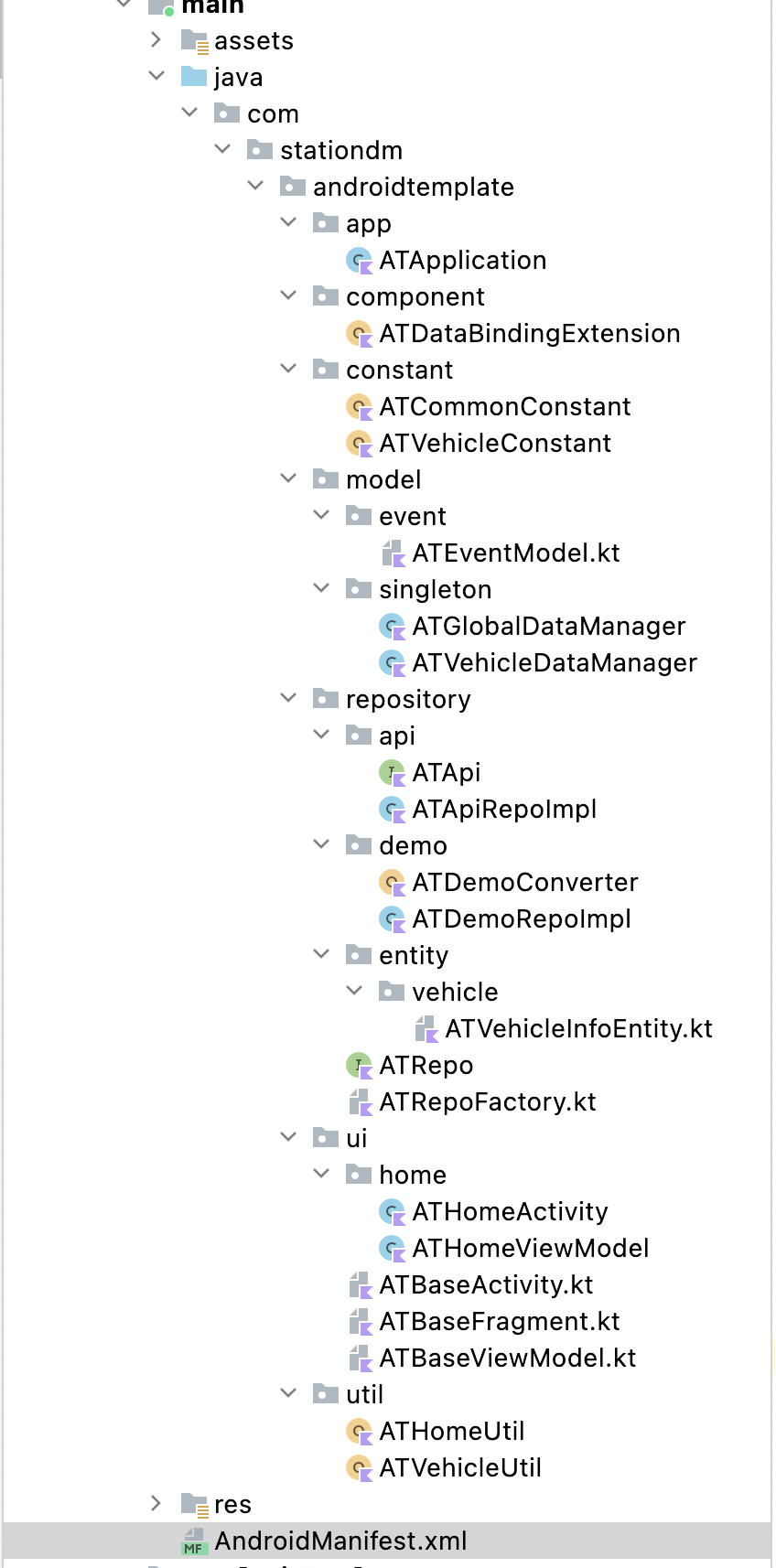
- APP 主工程下所有文件命名附加前缀,推荐采用项目缩写,不超过3个字符,比如:WD -> Woodare
- Common lib module下新建的文件以 SDM 作为文件前缀,这样后续如有必要可以单独抽出来作为库使用
- Kotlin Class 内部成员变量一律用小驼峰来命名,要求含义明确(名称+类型),比如 userNameLiveData;布尔变量以is, has或者enable开头,比如:isAccepted, hasReceived, enableToggle
- Kotlin 定义的const常量名统一大写
- 方法名以动词开头,例如: getUserInfo(),sendVehicleInfoRequest()
- 界面状态类是根据其描述的屏幕或部分屏幕的功能命名的。具体命名惯例如下: 功能 + UiState,比如NewsUiState。